-
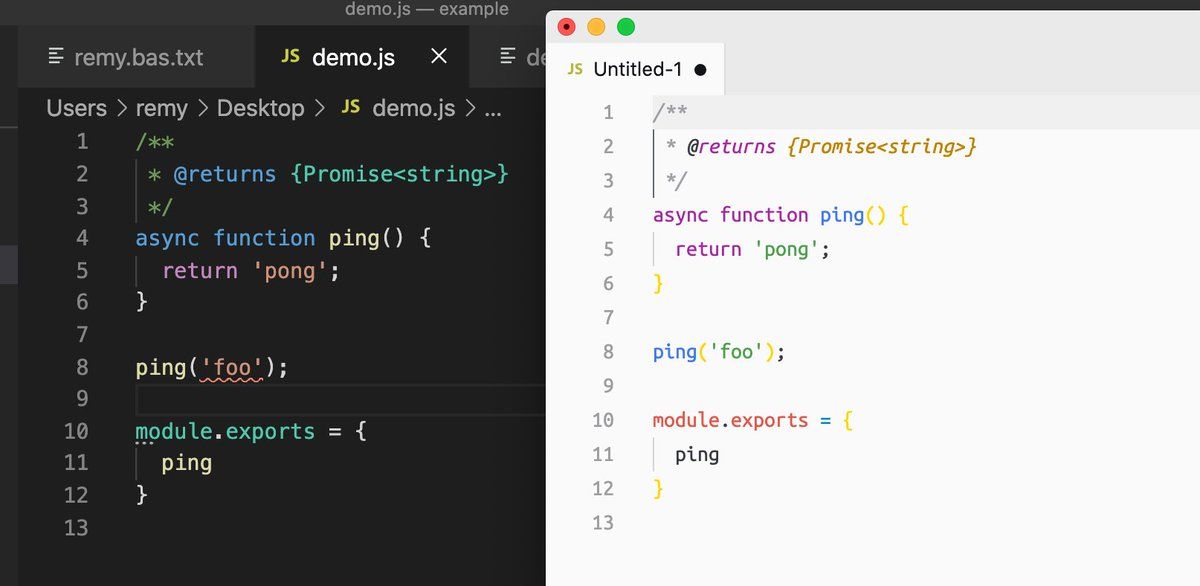
On the left: VS Code Insiders (no extensions or settings changed), on the right, my day-to-day vscode. Anyone got an ideas why rhs doesn't highlight "foo". The both have javascript.implicitProjectConfig.checkJs=true - but obviously I've got something tweaked in my day browser.On twitter.com
 ♻️ 1 Retweets
❤️ 6 Favorites
Mood -1 🙁
♻️ 1 Retweets
❤️ 6 Favorites
Mood -1 🙁
-
Bit more information. Also testing with all extensions disabled, same result. If I rename my day2day vscode file to .ts instead of .js the same validation occurs (though I don't want that to be the solution, it's wrong). So Insider must be adding some (default) TS validation…Permalink On twitter.com
Mood -2 🙁
-
Found it. I had this set to false (though now my code has lit up like a damn christmas tree!) "javascript.validate.enable": truePermalink On twitter.com
❤️ 8 Favorites
Mood +2 🙂
-
Sod, but I can't use a jsconfig.json (which I use to alias the base path)... Damnit, it's config-whack-a-mole.Permalink On twitter.com
❤️ 2 Favorites
Mood -4 🙁
-
Okay, final one, solved it: jsconfig.json: "compilerOptions": { "checkJs": true } (I had checkJs outside the compilerOptions … not that I'm using a compiler…)Permalink On twitter.com
❤️ 3 Favorites
Mood +3 🙂